
Figma Has Packaged the Generation Process Into a Reusable Tool
Figma introduced Weave on October 30, turning image and video generation and editing into reusable workflows on a node canvas. Teams can package an entire process into a tool for distribution, with models from Google, Kling, Runway and others.
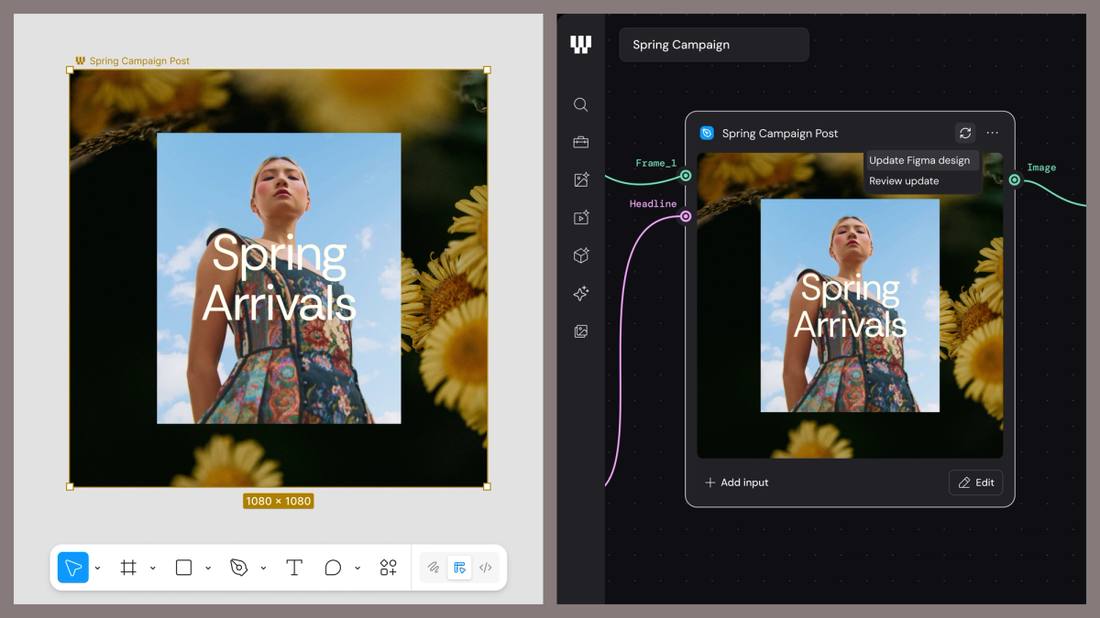
- 01THE NODES — Material, prompts, generation and editing are broken into nodes.
- 02THE WORKFLOW — Nodes connect into a workflow; branches explore different directions.
- 03THE TOOL — The workflow is packaged into a tool; the team fills in inputs and runs it.
WHAT HAPPENEDWhat Happened
Figma introduced Weave in an official blog post on October 30, a creative platform aimed at ongoing production needs. The approach breaks image and video generation and editing into nodes on a canvas; nodes connect into a workflow, and workflows can be run repeatedly on new material.
The node is the basic unit. Adding an image, writing a prompt, generating content, making an edit: each step is a node. Branches let the same material explore different directions. Once a workflow is packaged, it becomes a Weave tool; team members need not understand nodes at all, they just fill in inputs and get results.
Models come from multiple vendors. Image, video, audio and 3D models from Google, Kling, Runway, Luma and others can be mixed on the same canvas, while editing nodes offer masking, color grading, compositing, inpainting and relighting. Figma nodes can also connect frames from Figma Design into the workflow; when the source design changes, the content in the nodes changes with it.
VISIBLE PROCESSA Visible Process Is Weave's Real Product
One-off generation has no shortage of tools; what is scarce is a reusable process. Prompts written in a chat box are discarded after use, and the next person with new material starts over. Weave draws the process out: every step's model and edits are visible, and where to change a step or swap a model is unambiguous.
For teams, visibility means hand-over. The process is no longer locked inside one person's prompting habits; a newcomer can run the same line directly.
MODEL CHOICEMixing Models Is a Fight Over Choice
Weave builds no models of its own; multiple vendors' models sit on the same canvas. The same prompt can be sent to different models to compare results, and different steps can use different vendors' strengths. That returns model choice from the platform to the team.
The cost is that subscriptions and billing still have to be worked out by the team itself. It starts free, with paid tiers for heavy use, and the actual cost depends on the model mix; there is no single flat price.
DESIGN LINKLinking Design Files Into the Generation Flow Is the Key Move
The Figma node is the most Figma-flavored part of Weave. Frames from a design system can become generation material directly; when the source changes, references in the generation flow change with it. Brand visuals stop being one-off exports and become continuously live inputs.
That is most useful for teams with a design system. For teams without one, Weave remains a capable generation canvas at a discount in value.
THE SHIFTWhat Changed
SIGNAL JUDGMENT — ANALYSISThe Process Is the Creative Asset
Tokenta Signal's judgment: competition among generation tools is shifting from the quality of a single image to the reusability of the process. Only a process that can be kept becomes an asset for the team.
WHAT REMAINS UNCERTAINWhat Remains Uncertain
EVIDENCEEvidence
The original confirms Figma's October 30 official blog post introducing Weave, which turns image and video generation and editing into reusable workflows on a node canvas; workflows can be packaged into team tools, and models come from multiple vendors.
PRIMARY SOURCESPrimary Sources
- Figma official blog: The TL;DR on Figma Weave
https://www.figma.com/blog/the-tldr-on-figma-weave/ - Figma Weave product page: AI Image to Video Generator
https://www.figma.com/solutions/ai-image-to-video-generator-weave/
RELATEDRelated Intelligence
- Microsoft Winds Down Its Oracle AI Cloud Rental as Older Nvidia Chips Fall Behind
- An Unreleased Anthropic Model Proved an 18-Year-Old Quantum Conjecture, Machine-Checked in Lean
- IBM Unveils Quantum System Two in Chicago, Its Most Advanced Computer Yet, Powered by Nighthawk
- Vistra Posts $1.14B Q3 Profit as Power EBITDA Jumps Over 50%, Lifts 2026 Outlook